Secure & Track Your Firearms-Related Records
  • Home
  • Software
    • Software Overview
    • System Settings
    • Personnel Section
    • Firearms Section
    • Qualification Section
    • Training Section
    • Inventory Section
    • Audit Logs Section
    • RTS AI Assistant
  • Live Demo
  • Pricing
  • Contact
  • More
    • Home
    • Software
      • Software Overview
      • System Settings
      • Personnel Section
      • Firearms Section
      • Qualification Section
      • Training Section
      • Inventory Section
      • Audit Logs Section
      • RTS AI Assistant
    • Live Demo
    • Pricing
    • Contact

  • Home
  • Software
    • Software Overview
    • System Settings
    • Personnel Section
    • Firearms Section
    • Qualification Section
    • Training Section
    • Inventory Section
    • Audit Logs Section
    • RTS AI Assistant
  • Live Demo
  • Pricing
  • Contact

System Settings | Home Section

RTS Administration, Users, & System Settings
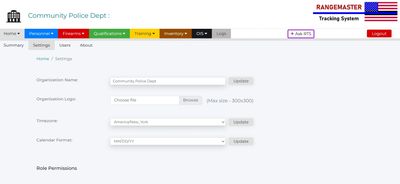
The RTS Home section gives authorized administrators a central location to manage users, agency settings, subscription information, and database backups. 

Summary Page

Information about the current logged-in user.

Settings Page

Settings for the overall program, including agency name, agency logo, timezone, calendar format, role permissions, and database import. 

Users Page

Add/edit a list of authorized users and and set their role permissions.

About Page

Enter subscription renewal key. Subscription expiration date. Terms of Use agreement.

Home Section Video Tutorial

Copyright© 2026  |  Rangemaster Tracking System  |  All Rights Reserved.

A service from Armed Profession Consulting, LLC.

Phoenix, Arizona, United States

  • Contact
  • Privacy Policy
  • Terms of Use

Powered by

This website uses cookies.

We use cookies to analyze website traffic and optimize your website experience. By accepting our use of cookies, your data will be aggregated with all other user data.

DeclineAccept